NSF NEON, Operated by Battelle

Main navigation

  • About
    • NEON Overview
      • Vision and Management
      • Spatial and Temporal Design
      • History
    • About the NEON Biorepository
      • ASU Biorepository Staff
      • Contact the NEON Biorepository
    • Observatory Blog
    • Newsletters
    • Staff
    • FAQ
    • Contact Us

    About

  • Data
    • Data Portal
      • Data Availability Charts
      • API & GraphQL
      • Prototype Data
      • Externally Hosted Data
    • Data Collection Methods
      • Airborne Observation Platform (AOP)
      • Instrument System (IS)
        • Instrumented Collection Types
        • Aquatic Instrument System (AIS)
        • Terrestrial Instrument System (TIS)
      • Observational System (OS)
        • Observation Types
        • Observational Sampling Design
        • Sampling Schedules
        • Taxonomic Lists Used by Field Staff
        • Optimizing the Observational Sampling Designs
      • Protocols & Standardized Methods
    • Getting Started with NEON Data
      • neonUtilities for R and Python
      • Learning Hub
      • Code Hub
    • Using Data
      • Data Formats and Conventions
      • Released, Provisional, and Revised Data
      • Data Product Bundles
      • Usage Policies
      • Acknowledging and Citing NEON
      • Publishing Research Outputs
    • Data Notifications
    • NEON Data Management
      • Data Availability
      • Data Processing
      • Data Quality

    Data

  • Samples & Specimens
    • Biorepository Sample Portal at ASU
    • About Samples
      • Sample Types
      • Sample Repositories
      • Megapit and Distributed Initial Characterization Soil Archives
    • Finding and Accessing Sample Data
      • Species Checklists
      • Sample Explorer - Relationships and Data
      • Biorepository API
    • Requesting and Using Samples
      • Loans & Archival Requests
      • Usage Policies

    Samples & Specimens

  • Field Sites
    • Field Site Map and Info
    • Spatial Layers & Printable Maps

    Field Sites

  • Resources
    • Getting Started with NEON Data
    • Research Support Services
      • Field Site Coordination
      • Letters of Support
      • Mobile Deployment Platforms
      • Permits and Permissions
      • AOP Flight Campaigns
      • Research Support FAQs
      • Research Support Projects
    • Code Hub
      • neonUtilities for R and Python
      • Code Resources Guidelines
      • Code Resources Submission
      • NEON's GitHub Organization Homepage
    • Learning Hub
      • Tutorials
      • Workshops & Courses
      • Science Videos
      • Teaching Modules
    • Science Seminars and Data Skills Webinars
    • Document Library
    • Funding Opportunities

    Resources

  • Impact
    • Research Highlights
    • Papers & Publications
    • NEON in the News

    Impact

  • Get Involved
    • Upcoming Events
    • Research and Collaborations
      • Environmental Data Science Innovation and Inclusion Lab
      • Collaboration with DOE BER User Facilities and Programs
      • EFI-NEON Ecological Forecasting Challenge
      • NEON Great Lakes User Group
      • NCAR-NEON-Community Collaborations
    • Advisory Groups
      • Science, Technology & Education Advisory Committee
      • Technical Working Groups
    • NEON Ambassador Program
      • Exploring NEON-Derived Data Products Workshop Series
    • Partnerships
    • Community Engagement
    • Work Opportunities

    Get Involved

  • My Account
  • Search

Search

Learning Hub

  • Tutorials
  • Workshops & Courses
  • Science Videos
  • Teaching Modules

Breadcrumb

  1. Resources
  2. Learning Hub
  3. Tutorials
  4. Publish Code - From R Markdown to HTML with knitr

Tutorial

Publish Code - From R Markdown to HTML with knitr

Authors:

Last Updated: Apr 8, 2021

In this tutorial, we will cover the R knitr package that is used to convert R Markdown into a rendered document (HTML, PDF, etc).

Learning Objectives

At the end of this activity, you will:

  • Be able to produce (‘knit’) an HTML file from a R Markdown file.
  • Know how to modify chunk options to change the output in your HTML file.

Things You’ll Need To Complete This Tutorial

You will need the most current version of R and, preferably, RStudio loaded on your computer to complete this tutorial.

Install R Packages

  • knitr: install.packages("knitr")
  • rmarkdown: install.packages("rmarkdown")

Share & Publish Results Directly from Your Code!

The knitr package allow us to:

  • Publish & share preliminary results with collaborators.
  • Create professional reports that document our workflow and results directly from our code, reducing the risk of accidental copy and paste or transcription errors.
  • Document our workflow to facilitate reproducibility.
  • Efficiently change code outputs (figures, files) given changes in the data, methods, etc.

Publish from Rmd files with knitr

To complete this tutorial you need:

  1. The R knitr package to complete this tutorial. If you need help installing packages, visit the R packages tutorial.
  2. An R Markdown document that contains a YAML header, code chunks and markdown segments. If you don't have an .Rmd file, visit the R Markdown tutorial to create one.
**When To Knit**: Knitting is a useful exercise throughout your scientific workflow. It allows you to see what your outputs look like and also to test that your code runs without errors. The time required to knit depends on the length and complexity of the script and the size of your data.

How to Knit

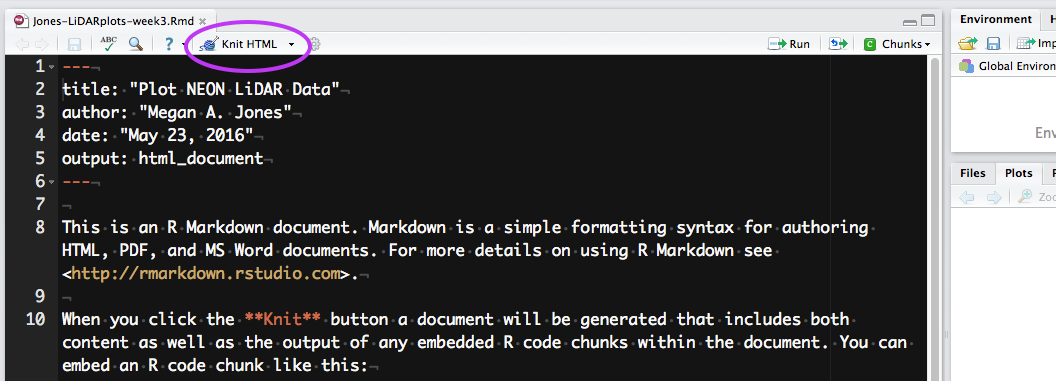
RStudio window with R Markdown template of new document and 'Knit HTML' button 
circled.
Location of the knit button in RStudio in Version 0.99.486. Source: National Ecological Observatory Network (NEON)

To knit in RStudio, click the knit pull down button. You want to use the
knit HTML for this lesson.

When you click the Knit HTML button, a window will open in your console titled R Markdown. This pane shows the knitting progress. The output (HTML in this case) file will automatically be saved in the current working directory. If there is an error in the code, an error message will appear with a line number in the R Console to help you diagnose the problem.

**Data Tip:** You can run `knitr` from the command prompt using: `render(“input.Rmd”, “all”)`.

Activity: Knit Script

Knit the .Rmd file that you built in the last tutorial. What does it look like?

View the Output
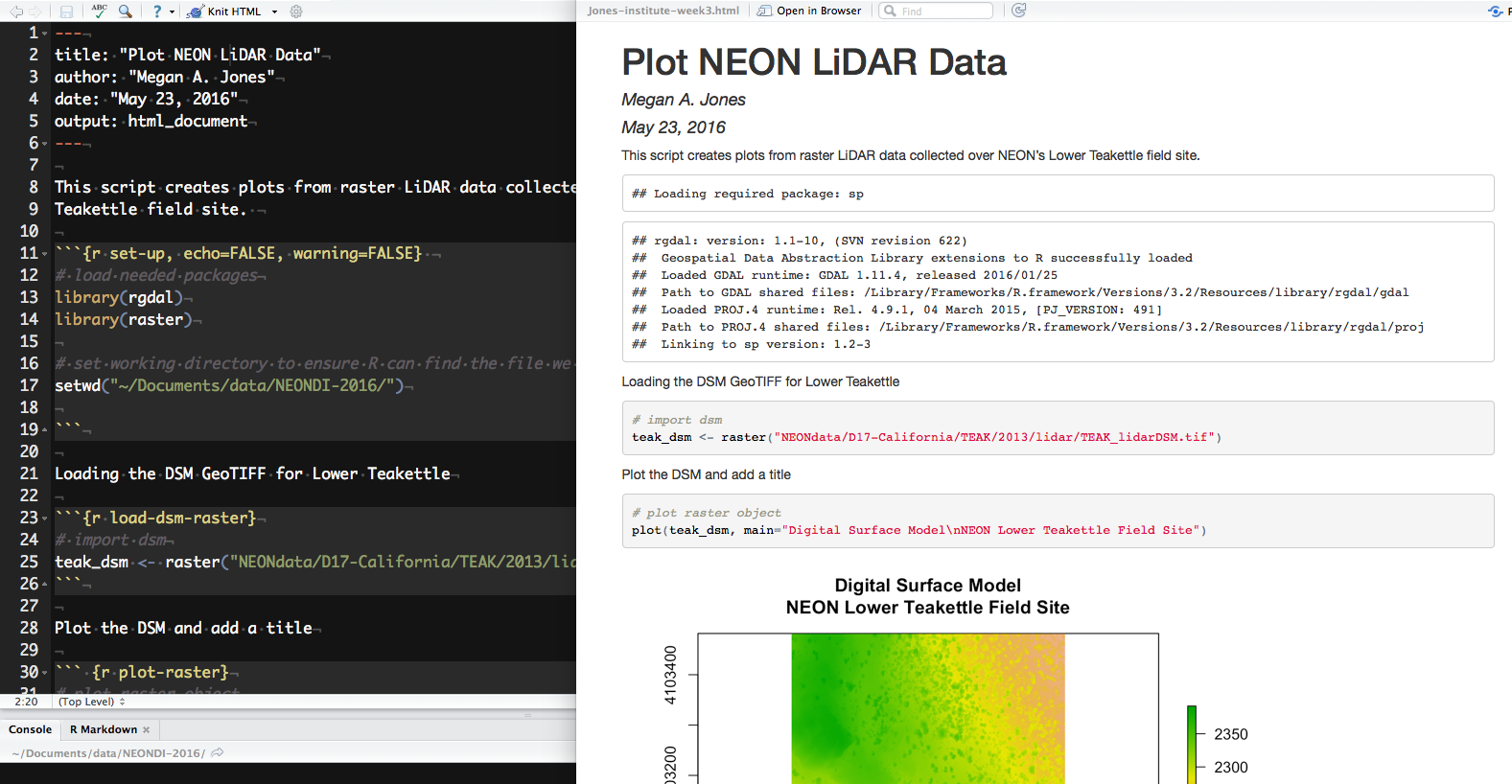
RStudio windows of R Markdown file, with activity content added, 
and HTML document with text, code, output and Digital Surface Model plot figure.
R Markdown (left) and the resultant HTML (right) after knitting. Source: National Ecological Observatory Network (NEON)

When knitting is complete, the new HTML file produced will automatically open.

Notice that information from the YAML header (title, author, date) is printed at the top of the HTML document. Then the HTML shows the text, code, and results of the code that you included in the RMD document.

Data Institute Participants: Complete Week 2 Assignment

  • Read this week’s assignment closely.
  • Be sure to carefully check your knitr output to make sure it is rendering the way you think it should!
  • When you are complete, submit your .Rmd and .html files to the NEON Institute participants GitHub repository (NEONScience/DI-NEON-participants).
  • The files will have automatically saved to your R working directory, you will need to transfer the files to the /participants/pre-institute3-rmd/ directory and submitted via a pull request.

Questions?

If you have questions or comments on this content, please contact us.

Contact Us
NSF NEON, Operated by Battelle

Follow Us:

Join Our Newsletter

Get updates on events, opportunities, and how NEON is being used today.

Subscribe Now

Footer

  • About Us
  • Contact Us
  • Terms & Conditions
  • Careers
  • Code of Conduct

Copyright © Battelle, 2026

The National Ecological Observatory Network is a major facility fully funded by the U.S. National Science Foundation.

Any opinions, findings and conclusions or recommendations expressed in this material do not necessarily reflect the views of the U.S. National Science Foundation.