
NSF NEON, Operated by Battelle

Main navigation

  • About
    • NEON Overview
      • Vision and Management
      • Spatial and Temporal Design
      • History
    • About the NEON Biorepository
      • ASU Biorepository Staff
      • Contact the NEON Biorepository
    • Observatory Blog
    • Newsletters
    • Staff
    • FAQ
    • Contact Us

    About

  • Data
    • Data Portal
      • Data Availability Charts
      • API & GraphQL
      • Prototype Data
      • Externally Hosted Data
    • Data Collection Methods
      • Airborne Observation Platform (AOP)
      • Instrument System (IS)
        • Instrumented Collection Types
        • Aquatic Instrument System (AIS)
        • Terrestrial Instrument System (TIS)
      • Observational System (OS)
        • Observation Types
        • Observational Sampling Design
        • Sampling Schedules
        • Taxonomic Lists Used by Field Staff
        • Optimizing the Observational Sampling Designs
      • Protocols & Standardized Methods
    • Getting Started with NEON Data
      • neonUtilities for R and Python
      • Learning Hub
      • Code Hub
    • Using Data
      • Data Formats and Conventions
      • Released, Provisional, and Revised Data
      • Data Product Bundles
      • Usage Policies
      • Acknowledging and Citing NEON
      • Publishing Research Outputs
    • Data Notifications
    • NEON Data Management
      • Data Availability
      • Data Processing
      • Data Quality

    Data

  • Samples & Specimens
    • Biorepository Sample Portal at ASU
    • About Samples
      • Sample Types
      • Sample Repositories
      • Megapit and Distributed Initial Characterization Soil Archives
    • Finding and Accessing Sample Data
      • Species Checklists
      • Sample Explorer - Relationships and Data
      • Biorepository API
    • Requesting and Using Samples
      • Loans & Archival Requests
      • Usage Policies

    Samples & Specimens

  • Field Sites
    • Field Site Map and Info
    • Spatial Layers & Printable Maps

    Field Sites

  • Resources
    • Getting Started with NEON Data
    • Research Support Services
      • Field Site Coordination
      • Letters of Support
      • Mobile Deployment Platforms
      • Permits and Permissions
      • AOP Flight Campaigns
      • Research Support FAQs
      • Research Support Projects
    • Code Hub
      • neonUtilities for R and Python
      • Code Resources Guidelines
      • Code Resources Submission
      • NEON's GitHub Organization Homepage
    • Learning Hub
      • Tutorials
      • Workshops & Courses
      • Science Videos
      • Teaching Modules
    • Science Seminars and Data Skills Webinars
    • Document Library
    • Funding Opportunities

    Resources

  • Impact
    • Research Highlights
    • Papers & Publications
    • NEON in the News

    Impact

  • Get Involved
    • Upcoming Events
    • Research and Collaborations
      • Environmental Data Science Innovation and Inclusion Lab
      • Collaboration with DOE BER User Facilities and Programs
      • EFI-NEON Ecological Forecasting Challenge
      • NEON Great Lakes User Group
      • NCAR-NEON-Community Collaborations
    • Advisory Groups
      • Science, Technology & Education Advisory Committee
      • Technical Working Groups
    • NEON Ambassador Program
      • Exploring NEON-Derived Data Products Workshop Series
    • Partnerships
    • Community Engagement
    • Work Opportunities

    Get Involved

  • My Account
  • Search

Search

Learning Hub

  • Tutorials
  • Workshops & Courses
  • Science Videos
  • Teaching Modules

Breadcrumb

  1. Resources
  2. Learning Hub
  3. Tutorials
  4. Interactive Data Vizualization with R and Plotly

Tutorial

Interactive Data Vizualization with R and Plotly

Authors: Megan A. Jones, Leah A. Wasser

Last Updated: Jan 24, 2024

Plotly - Interactive (and Online) Plots

Plotly bills itself as "a collaborative platform for modern data science". You can use it to build interactive plots that can easily be shared with others (like the Quantifying The Drivers and Impacts of Natural Disturbance Events – The 2013 Colorado Floods lessons).

You will need an free online Plotly account to post & share you plots online. But you can create the plots and use them on your local computer without an account. If you do not wish to share plots online you can skip to Step 3: Create Plotly plot.

Additional information on the plotly R package can be found on the Plotly R Getting Started page.

Note: Plotly doesn't just work with R -- other programs include Python, MATLAB, Excel, and JavaScript.

Step 1: Create account

If you do not already have an account, you need to set up an account by visiting the Plotly website and following the directions there.

Step 2: Connect account to R

To share plots from R (or RStudio) to Plotly, you have to connect to your account. This is done through an API (Application Program Interface). You can find your username & API key in your profile settings on the Plotly website under the "API key" menu option.

To link your account to your R, use the following commands, substituting in your own username & key as appropriate.

# set plotly user name
Sys.setenv("plotly_username"="YOUR_USERNAME")
# set plotly API key
Sys.setenv("plotly_api_key"="YOUR_KEY")

Step 3: Create Plotly plot

There are lots of ways to plot with the plotly package. We briefly describe two basic functions plotly() and ggplotly(). For more information on plotting in R with Plotly, check out the Plotly R library page.

Here we use the example dataframe economics that comes with the package.

# load packages
library(ggplot2) # to create plots and feed to ggplotly()
library(plotly)  # to create interactive plots

# view str of example dataset
str(economics)

## tibble [574 × 6] (S3: spec_tbl_df/tbl_df/tbl/data.frame)
##  $ date    : Date[1:574], format: "1967-07-01" "1967-08-01" ...
##  $ pce     : num [1:574] 507 510 516 512 517 ...
##  $ pop     : num [1:574] 198712 198911 199113 199311 199498 ...
##  $ psavert : num [1:574] 12.6 12.6 11.9 12.9 12.8 11.8 11.7 12.3 11.7 12.3 ...
##  $ uempmed : num [1:574] 4.5 4.7 4.6 4.9 4.7 4.8 5.1 4.5 4.1 4.6 ...
##  $ unemploy: num [1:574] 2944 2945 2958 3143 3066 ...

# plot with the plot_ly function
unempPerCapita <- plot_ly(x =economics$date, y = economics$unemploy/economics$pop)

To make your plotly plot in R, run the following line:

unempPerCapita 

Note: This plot is interactive within the R environment but is not as posted on this website.

If you already use ggplot to create your plots, you can directly turn your ggplot objects into interactive plots with ggplotly().

## plot with ggplot, then ggplotly

unemployment <- ggplot(economics, aes(date,unemploy)) + geom_line()
unemployment
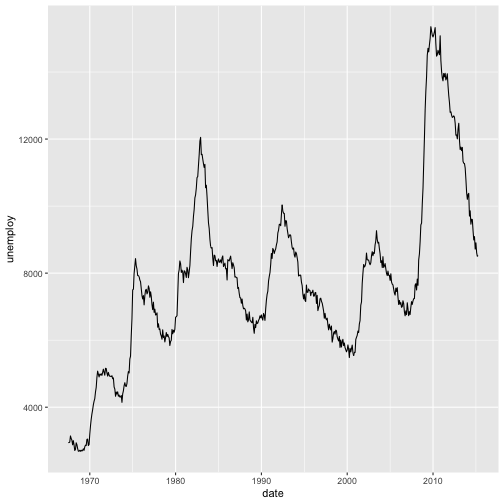
To make your plotly plot in R, run the following line:

ggplotly(unemployment)

Note: This plot is interactive within the R environment but is not as posted on this website.

Step 4: Publish to Plotly

The function plotly_POST() allows you to post any plotly plot to your account.

# publish plotly plot to your plotly online account
api_create(unemployment)

Examples

The plots below were generated using R code that harnesses the power of the ggplot2 and the plotly packages. The plotly code utilizes the RopenSci plotly packages - check them out!

Data Tip Are you a Python user? Use matplotlib to create and publish visualizations.

Get Lesson Code

DataVis-plotly-R.R

Questions?

If you have questions or comments on this content, please contact us.

Contact Us
NSF NEON, Operated by Battelle

Follow Us:

Join Our Newsletter

Get updates on events, opportunities, and how NEON is being used today.

Subscribe Now

Footer

  • About Us
  • Contact Us
  • Terms & Conditions
  • Careers
  • Code of Conduct

Copyright © Battelle, 2026

The National Ecological Observatory Network is a major facility fully funded by the U.S. National Science Foundation.

Any opinions, findings and conclusions or recommendations expressed in this material do not necessarily reflect the views of the U.S. National Science Foundation.