NSF NEON, Operated by Battelle

Main navigation

    • About Overview
    • NEON Overview
    • About the NEON Biorepository
    • Observatory Blog
    • Newsletter
    • Staff
    • FAQ
    • User Accounts
    • Contact Us
    • Data Overview
    • Data Portal
    • Data Availability Charts
    • API & GraphQL
    • Prototype Data
    • Data Collection Methods
    • Getting Started with NEON Data
    • Using Data
    • Data Notifications
    • NEON Data Management
    • Samples & Specimens Overview
    • NEON Biorepository Sample Portal at ASU
    • About NEON Samples
    • Sample Types
    • Finding and Accessing Sample Data
    • Species Checklists
    • Requesting and Using Samples
    • Acknowledging and Citing the NEON Biorepository
    • Biorepository Research Projects
    • Field Sites Overview
    • Field Site Map and Info
    • Spatial Data Layers & Maps
    • Resources Overview
    • Getting Started with NEON Data
    • Research Support Services
    • Code Hub
    • Learning Hub
    • Science Seminars and Data Skills Webinars
    • Document Library
    • Funding Opportunities
    • Impact Overview
    • Research Highlights
    • Papers & Publications
    • NEON in the News
    • Get Involved Overview
    • Upcoming Events
    • Past Events
    • Research and Collaborations
    • Advisory Groups
    • NEON Ambassador Program
    • Partnerships
    • Community Engagement
    • Work Opportunities

Search

Learning Hub

  • Tutorials
  • Workshops & Courses
  • Science Videos
  • Teaching Modules

Breadcrumb

  1. Resources
  2. Learning Hub
  3. Tutorials
  4. Document & Publish Your Workflow: R Markdown & knitr

Tutorial

Document & Publish Your Workflow: R Markdown & knitr

Authors:

Last Updated: Apr 2, 2026

This tutorial we will work with the knitr and rmarkdown packages within RStudio to learn how to effectively and efficiently document and publish our workflows online.

Learning Objectives

At the end of this activity, you will be able to:

  • Explain why documenting and publishing one's code is important.
  • Describe two tools that enable ease of publishing code & output: R Markdown and the knitr package.

Documentation Is Important

As we read in the Reproducible Science overview, the four facets of reproducible science are:

  • Documentation
  • Organization,
  • Automation and
  • Dissemination.

This week we will learn about the R Markdown file format (and R package) which can be used with the knitr package to document and publish (disseminate) your code and code output.

View Slideshow: Share, Publish & Archive - from the Reproducible Science Curriculum

The Tools We Will Use

R Markdown

“R Markdown is an authoring format that enables easy creation of dynamic documents, presentations, and reports from R. It combines the core syntax of markdown (an easy to write plain text format) with embedded R code chunks that are run so their output can be included in the final document. R Markdown documents are fully reproducible (they can be automatically regenerated whenever underlying R code or data changes)." -- RStudio documentation.

We use markdown syntax in R Markdown (.rmd) files to document workflows and to share data processing, analysis and visualization outputs. We can also use it to create documents that combine R code, output and text.

**Data Tip:** Most of the NEON Data Skills educational resources on this site are built using R Markdown files.

Why R Markdown?

There are many advantages to using R Markdown in your work:

  • Human readable syntax.
  • Simple syntax - it can be learned quickly.
  • All components of your work are clearly documented. You don't have to remember what steps, assumptions, tests were used.
  • You can easily extend or refine analyses by modifying existing or adding new code blocks.
  • Analysis results can be disseminated in various formats including HTML, PDF, slide shows and more.
  • Code and data can be shared with a colleague to replicate the workflow.
**Data Tip:** RPubs is a quick way to share and publish code.

Knitr

The knitr package for R allows us to create readable documents from R Markdown files.
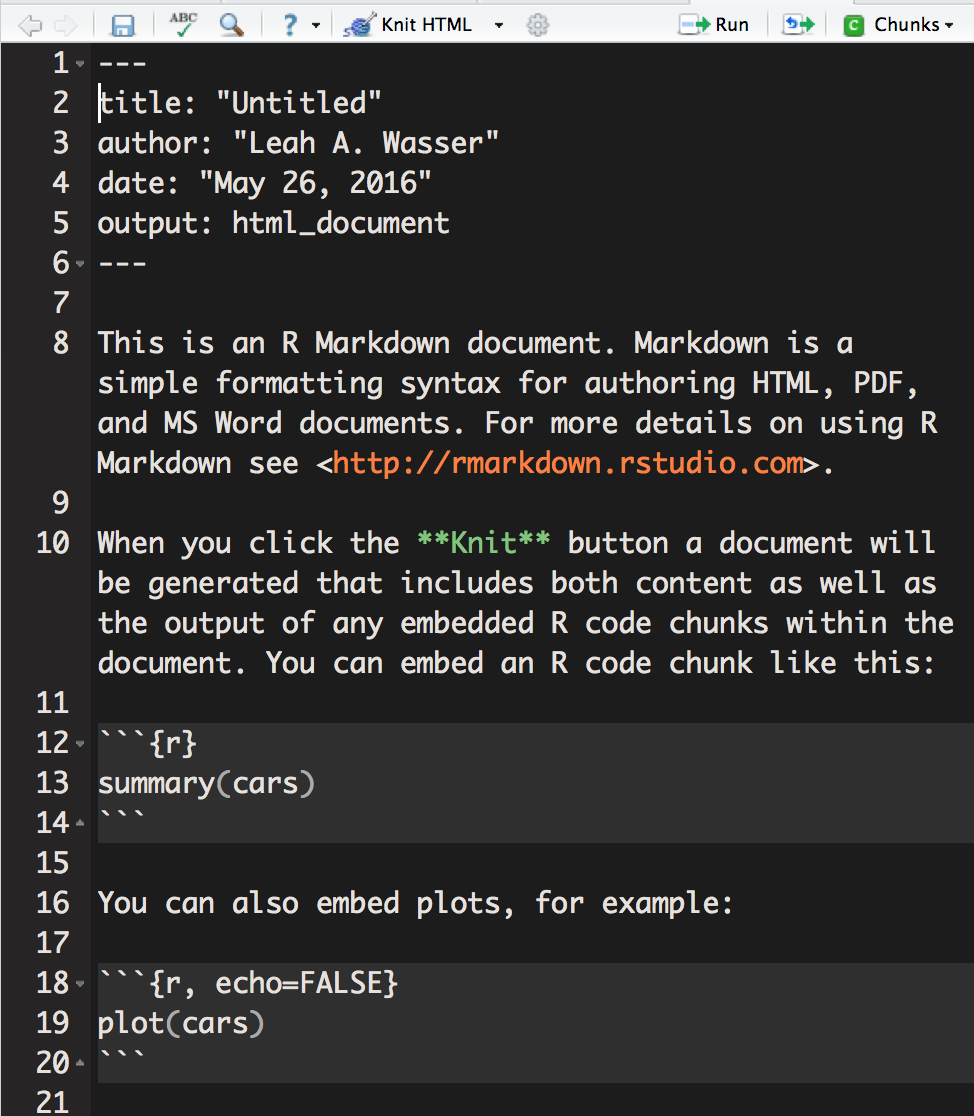
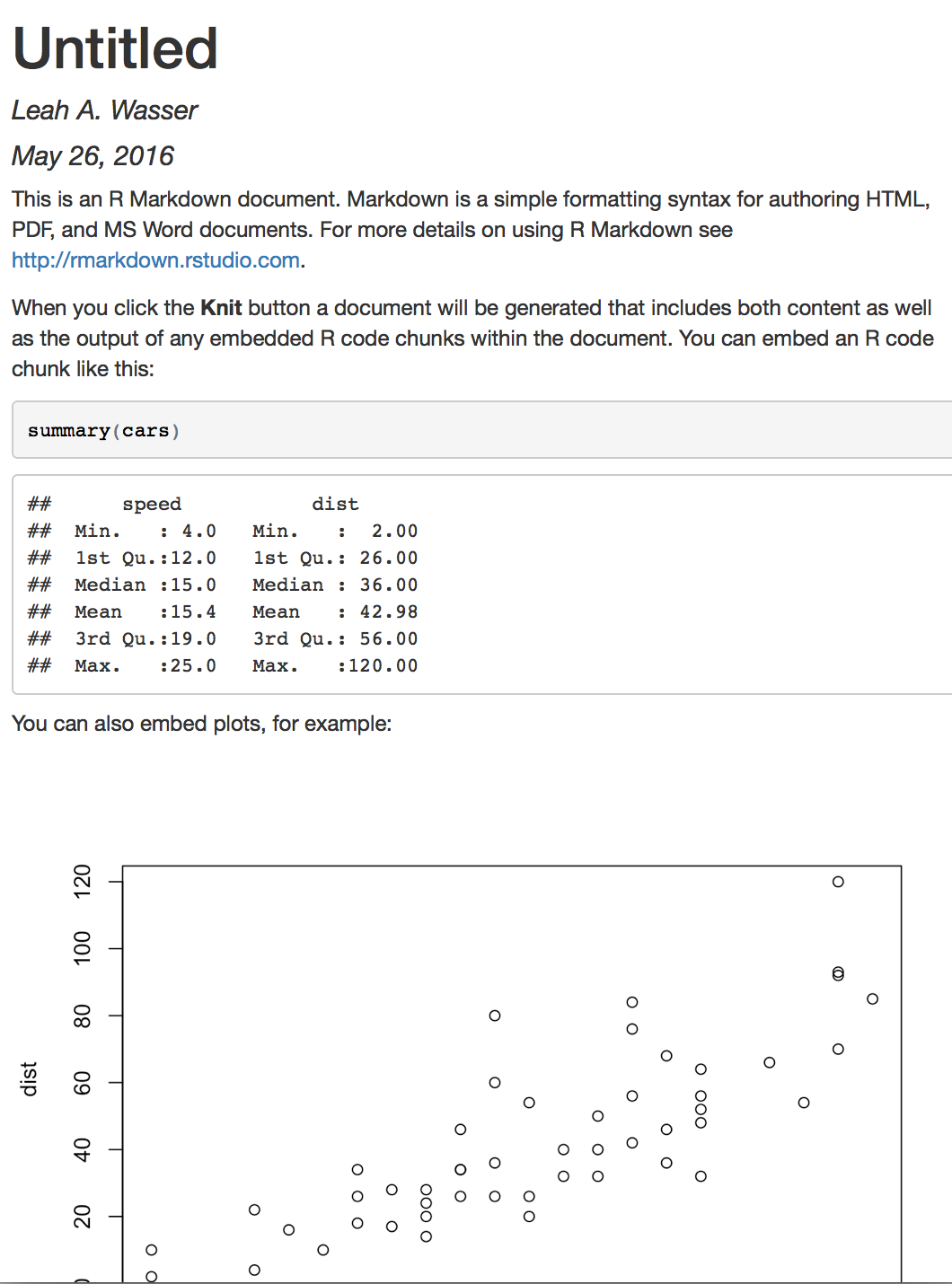
RStudio window with default template of a new R Markdown file. HTML document generated from knit R Markdown file, including 
formatted YAML header, text, code, computed data output and scatter plot.
R Markdown script (left) and the HTML produced from the knit R Markdown script (right). Source: National Ecological Observatory Network (NEON)
>The knitr package was designed to be a transparent engine for dynamic report generation with R -- Yihui Xi -- knitr package creator

In the next tutorial we will learn more about working with the R Markdown format in RStudio.

Questions?

If you have questions or comments on this content, please contact us.

Contact Us
NSF NEON, Operated by Battelle

Follow Us:

Join Our Newsletter

Get updates on events, opportunities, and how NEON is being used today.

Subscribe Now

Footer

  • About Us
  • Contact Us
  • Terms & Conditions
  • Careers
  • Code of Conduct

Copyright © Battelle, 2026

The National Ecological Observatory Network is a major facility fully funded by the U.S. National Science Foundation.

Any opinions, findings and conclusions or recommendations expressed in this material do not necessarily reflect the views of the U.S. National Science Foundation.