User Accounts
All NEON data is free for use, but logging in to an account or using a valid API token is required for downloading data packages. This benefits you in two direct ways:
- NEON’s impact on science is largely understood through the lens of knowing how people are using NEON’s data, samples, resources and infrastructure. NEON is fully funded by the National Science Foundation (NSF) and NEON makes regular reports (using anonymized data) back to the NSF to communicate use of the observatory and to better understand and optimize the utility of NEON, improve NEON’s services, and build a robust user community.
- NEON is dedicated to providing open data to a broad research community, in a fiscally responsible way. Data egress (download) costs to NEON can be significant given the large and ever-growing data volumes that NEON publishes, and authentication allows NEON to better distinguish between valid research use vs. bots scraping data for unknown purposes.
Account Services
When you have an account, NEON can provide customized services! You can currently:
- Request and instantly receive an API token, which will reduce rate limiting on intensive queries to the API.
- Sign-up for customized notifications on updates to the data products and field sites you are most interested in.
- Sign up to volunteer to serve as a subject matter expert to provide ad hoc technical advice to NEON.
Account Protections
NEON uses Auth0, a highly secure identity management platform to manage user account data. This means your information, including password, is completely encrypted. NEON will never give or sell your email address or other personal information to any person or organization. NEON reports anonymized user demographic information and general website activity to NEON's sole funder, the U.S. National Science Foundation (NSF). Your anonymized account information may be used to help NEON develop website usage metrics and to improve the quality of website services for all users.
We want to make it easy for you to manage your account and feel secure that your data belong to you. Therefore, we provide options to view, edit, download, and delete your user information. See Terms of Use.
Create Account
1. Click on the Sign In link in the top right corner of any webpage.
2. Scroll down to click the checkbox next to "I agree to the terms of service and privacy policy". Once this is checked, you can select one of the Sign Up buttons and fill out the form.
3. You can either set up your account using credentials from a Google account or through the CILogon service by clicking on one of the buttons, or by entering your email address and preferred password below the buttons. CILogon provides access to many other account systems, including GitHub, ORCID, and many academic institutions. If you'd like to use your GitHub, ORCID, or university account, then click the "Sign up with CILogon" button and follow the directions in the CILogon webpage.
4. Once you finish the registration process, you will be redirected to your user account information page, where you can customize your preferences.
Using Your Account
Verify your email address
You will receive an email to the address you provided with a request to verify your address. Once you have completed this, you may need to log out, log back in again, and finish filling out required fields in your My Account page.
Verify your account
Required fields in the My Account page must be completed before you will be able to download data. At minimum, fill out the fields highlighted in yellow boxes, as shown in the below screenshot. You may choose to opt in to other fields at this time. When finished, click the blue "Save Changes" button on the left side.
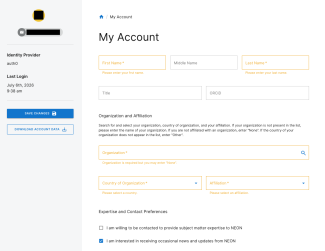
Screenshot of the My Account page, with required fields highlighted in yellow.
Update your preferences
Expertise and Contact Preferences
NEON occasionally asks the community for specific guidance on science designs and protocols, data accessibility, and other topics. If you are willing for NEON to reach out to you, please click the "I am willing to be contacted..." box (see the bottom of the screenshot above). Two other fields will appear asking you for information about the areas of your expertise.
Data/samples and fields site notifications
NEON periodically sends out emails with information about data and sample availability and quality, updates to NEON code, or access to field sites. To sign up for these notifications, scroll down to the Data Products of Interest and Sites of Interest section. For Data Products, you may choose to opt in to all data products, a subset of data products, or single data products. Notifications about samples will be associated with their related data products; for example, if you are interested in mosquito samples, please select at least one related mosquito data product. For field sites, you may opt in to all sites or a customized selection of sites.
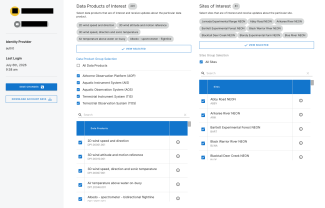
Screenshot of the notifications section of the My Account page.
Download your account data
If you'd like to download a copy of all of your account information, click on the Download Account Data button.
Reset your password
Open the Sign In page and click on "Don't remember your password". Enter the email for your account, and click "Send Email". The system with send you an email with a reset link. If you don't receive an email, that means your email is not in our system and you will need to create a new account. If in doubt, please contact us.
Delete your account
You may delete your account at any time. You may wish to download your information before you delete your account - just click on the Download Account Data button to do so. Then click the red Delete Account button at the bottom of the page. Once your account is deleted, you will lose access to any services or privileges that were associated with your account, including API tokens and, for our partnering labs, access to our lab data ingest webpage.
Using an API token
An API is a common means of sharing digital information. It provides a communication path for a software application to obtain information from a digital data source. Your NEON API token is a unique, string-based credential that will authenticate and authorize your requests to the NEON API so you can programmatically query and obtain data. An API token can be generated by going to the bottom of the My Account page, and clicking on the "Get API Token" button. API tokens may be disabled or deleted at any time by clicking on the three dots to the right of the token, and then clicking on either option.
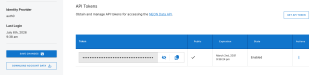
Screenshot of the API token section of the My Accounts page.
Resources to get started with an API token:
Set up a NEON API token (Data Skills Tutorial)
Use an API token when accessing NEON data with neonUtilities (Data Skills Tutorial)
Create and Use a NEON API Token in R and Python (YouTube Video)